> For the complete documentation index, see [llms.txt](https://docs.b2ihealthcare.com/snowray/llms.txt). Markdown versions of documentation pages are available by appending `.md` to page URLs; this page is available as [Markdown](https://docs.b2ihealthcare.com/snowray/v2.12/reference/resources/valuesets/authoring.md).
# Authoring
{% hint style="info" %}
To enter editing mode and access functionalities related to authoring, click on the button in the upper right corner of the selected Value Set's content page.
{% endhint %}
## Add a New Clause
New clauses can be added by constructing a query expression supported by the domain Code System after clicking on the area surrounded by an intermittent line under the *Inclusions* and *Exclusions* sections.
{% hint style="info" %}
Most of the terminologies support Expression Constraint Language to a certain extent, e.g. selecting a hierarchy via < or << or filter by attribute refinements. If such support is not available for the given Code System, then single ID inclusions/exclusions can be created forming an extensional Value Set at the end.
{% endhint %}

{% hint style="info" %}
While authoring, clauses highlight parts of the hierarchy with colors. These help identify which part of the hierarchy is included (green and/or normal gray), excluded (red), suggested (purple), or just displayed (light gray) for contextual information.
If selecting a concept from the terminology tree the clause that involves the concept will be highlighted.
{% endhint %}

There are different ways to add clauses to a Value Set. For more information visit the following pages:
{% content-ref url="/pages/-MgLfhQklrGXDUBU-004" %}
[Drag and Drop](/snowray/v2.12/reference/resources/valuesets/authoring/dnd.md)
{% endcontent-ref %}
{% content-ref url="/pages/-MgLcrL7T31wDCvCbEiN" %}
[Basic Clause Editor](/snowray/v2.12/reference/resources/valuesets/authoring/editor.md)
{% endcontent-ref %}
{% content-ref url="/pages/-MgLd0nRrl6iBdiA5LTA" %}
[Paste from clipboard](/snowray/v2.12/reference/resources/valuesets/authoring/copypaste.md)
{% endcontent-ref %}
{% content-ref url="/pages/-MiVgFdm5songIp0ykd\_" %}
[Import clauses from text file](/snowray/v2.12/reference/resources/valuesets/authoring/import.md)
{% endcontent-ref %}
{% content-ref url="/pages/-MgLdC16HOL6LocZ896N" %}
[Advanced Clause Editor](/snowray/v2.12/reference/resources/valuesets/authoring/advancededitor.md)
{% endcontent-ref %}
{% content-ref url="/pages/eYtjBuzCQD8gopcNqyz4" %}
[Update Operators](/snowray/v2.12/reference/resources/valuesets/authoring/update-operators.md)
{% endcontent-ref %}
{% content-ref url="/pages/FZjnRUrcuCZpD9Az6lmc" %}
[Revert](/snowray/v2.12/reference/resources/valuesets/authoring/revert.md)
{% endcontent-ref %}
## Edit Clause
Hovering over an existing clause reveals the icon, which enables editing the selected clause. Changes can be persisted by clicking on the sign.

{% hint style="info" %}
Hovering over a clause also reveals the icon, which enables pinning the selected clause to the top of the list.
{% endhint %}
## Optimize
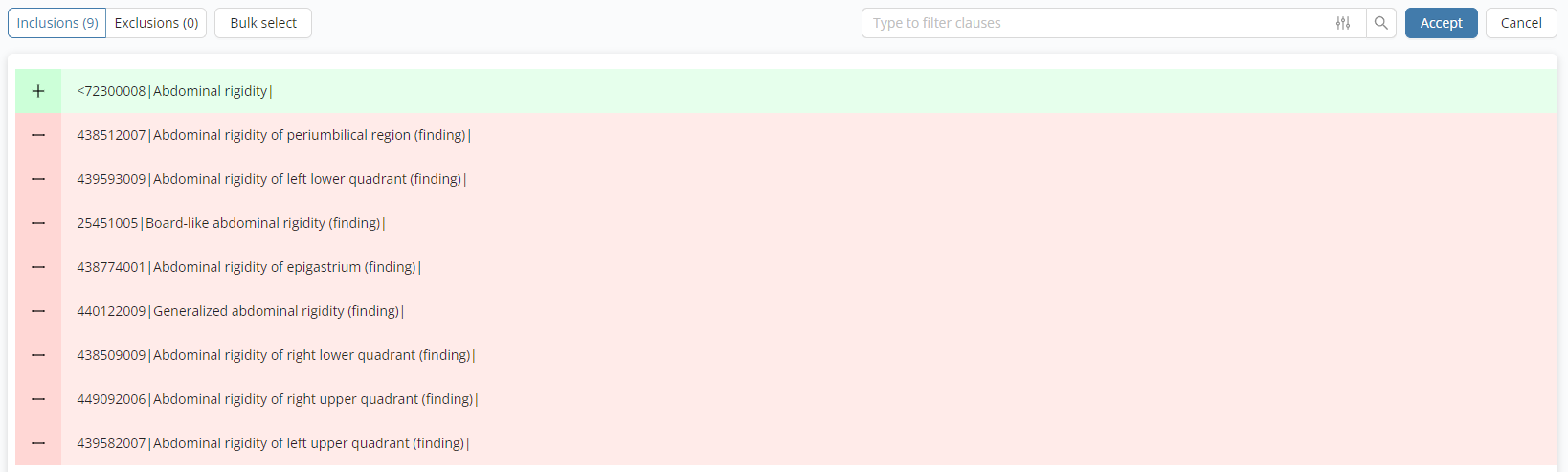
As part of the authoring process, users also have the option to optimize their Value Sets. This feature simplifies Value Sets by replacing individual members with [ECL ](https://confluence.ihtsdotools.org/display/DOCECL)expressions. For example, if all the children of a [concept](/snowray/v2.12/reference/resources/codesystems.md#concepts) are added, it will reduce the clauses to a single clause using the following format: `< parentId | FSN |`.
{% hint style="info" %}
To use this option, navigate to the specific Value Set and start [editing](/snowray/v2.12/reference/resources/valuesets.md#editing). Press the  button in the upper right corner and select the *Optimize* context menu option.
{% endhint %}
Value Set Optimize Plan
{% hint style="info" %}
To confirm the proposed plan, press the button.
{% endhint %}
 icon, which enables editing the selected clause. Changes can be persisted by clicking on the
  sign.

{% hint style="info" %}
Hovering over a clause also reveals the
sign.

{% hint style="info" %}
Hovering over a clause also reveals the  icon, which enables pinning the selected clause to the top of the list.
{% endhint %}
## Optimize
As part of the authoring process, users also have the option to optimize their Value Sets. This feature simplifies Value Sets by replacing individual members with [ECL ](https://confluence.ihtsdotools.org/display/DOCECL)expressions. For example, if all the children of a [concept](/snowray/v2.12/reference/resources/codesystems.md#concepts) are added, it will reduce the clauses to a single clause using the following format: `< parentId | FSN |`.
{% hint style="info" %}
To use this option, navigate to the specific Value Set and start [editing](/snowray/v2.12/reference/resources/valuesets.md#editing). Press the  button in the upper right corner and select the *Optimize* context menu option.
{% endhint %}
icon, which enables pinning the selected clause to the top of the list.
{% endhint %}
## Optimize
As part of the authoring process, users also have the option to optimize their Value Sets. This feature simplifies Value Sets by replacing individual members with [ECL ](https://confluence.ihtsdotools.org/display/DOCECL)expressions. For example, if all the children of a [concept](/snowray/v2.12/reference/resources/codesystems.md#concepts) are added, it will reduce the clauses to a single clause using the following format: `< parentId | FSN |`.
{% hint style="info" %}
To use this option, navigate to the specific Value Set and start [editing](/snowray/v2.12/reference/resources/valuesets.md#editing). Press the  button in the upper right corner and select the *Optimize* context menu option.
{% endhint %}
 button.
{% endhint %}
button.
{% endhint %}