> For the complete documentation index, see [llms.txt](https://docs.b2ihealthcare.com/snowray/llms.txt). Markdown versions of documentation pages are available by appending `.md` to page URLs; this page is available as [Markdown](https://docs.b2ihealthcare.com/snowray/v3.0/reference/resources/codesystems/custom-code-systems/import.md).

# Import

Users also have the option to add Code System by importing content.&#x20;

The import functionality can be accessed from the Resources page by pressing the ![](https://content.gitbook.com/content/ckoNppM37m1A9KBre9xY/blobs/1iKKyFYX9mwZsdsv0yCu/import_button.png)button located in the header area.

{% hint style="info" %}
Snowray supports FHIR (<img src="https://content.gitbook.com/content/ckoNppM37m1A9KBre9xY/blobs/gVHEQboX7FJbefKWmTBI/fhir_icon.svg" alt="" data-size="line">), XLS (<img src="https://content.gitbook.com/content/ckoNppM37m1A9KBre9xY/blobs/Qwkoun0pfjgmlx8VWNeS/xls_icon.svg" alt="" data-size="line">) and CSV (<img src="https://content.gitbook.com/content/ckoNppM37m1A9KBre9xY/blobs/UogFxNCqgTKL48GWXVwF/csv_icon.svg" alt="" data-size="line">) formats for Code System import.
{% endhint %}

Users have two options to specify the import file in the import wizards: either by clicking in the import area and using the selector, or by drag and dropping it to the designated area.

## FHIR import

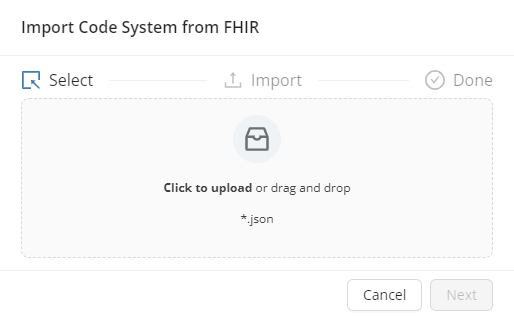
<figure><img src="https://content.gitbook.com/content/ckoNppM37m1A9KBre9xY/blobs/wDMjzdxxkzf8XvY3xTaY/code_system_import_wizard_fhir.png" alt=""><figcaption><p>Code System FHIR Import Wizard</p></figcaption></figure>

With the import file in place, clicking![](https://content.gitbook.com/content/ckoNppM37m1A9KBre9xY/blobs/fgyTLXycugjI4Z5VfXcr/next_button.png)will perform the import.

{% hint style="success" %}
Once completed, the wizard will report the successful process <img src="https://content.gitbook.com/content/ckoNppM37m1A9KBre9xY/blobs/0yW6apOFORZRaOWIrP1c/import_complete_icon.svg" alt="" data-size="line">
{% endhint %}

## XLS import

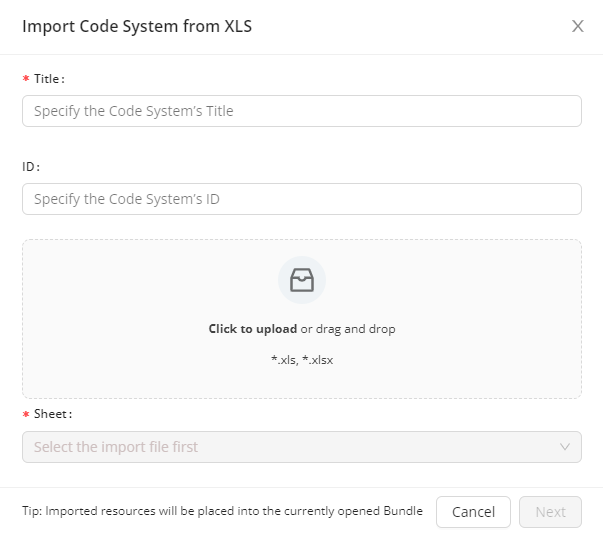
<figure><img src="https://content.gitbook.com/content/ckoNppM37m1A9KBre9xY/blobs/x4av57S0T0ggIXLwmRPu/code_system_import_wizard_xls.png" alt=""><figcaption><p>Code System XLS Import Wizard</p></figcaption></figure>

| Field                 | Description                                                                                                                         |
| --------------------- | ----------------------------------------------------------------------------------------------------------------------------------- |
| **Code System Title** | The title of the Code System (mandatory)                                                                                            |
| **Code System ID**    | The identifier of the Code System. If you leave this field empty, the system will automatically generate an ID for your Code System |
| **Sheet**             | The sheet of the import file from which content will be imported (mandatory)                                                        |

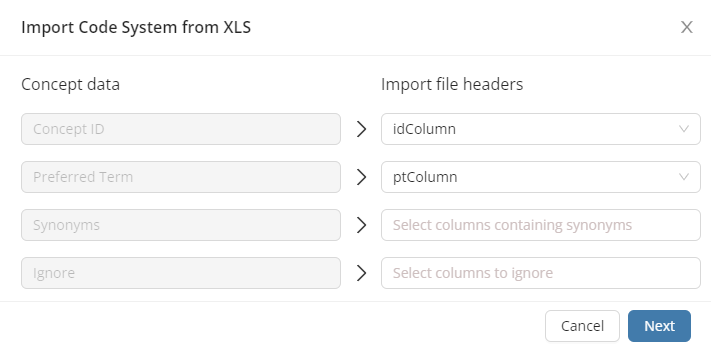
<figure><img src="https://content.gitbook.com/content/ckoNppM37m1A9KBre9xY/blobs/UjbC0eMbEqvMwjMvL3vX/code_system_import_wizard_xls_parameters.png" alt=""><figcaption><p>Code System XLS Import Wizard - Specifying Parameters</p></figcaption></figure>

| Field              | Description                                                             |
| ------------------ | ----------------------------------------------------------------------- |
| **Concept ID**     | The column from which data will be used to generate concept IDs         |
| **Preferred Term** | The column from which data will be used to generate the preferred terms |
| **Synonyms**       | The column(s) from which data will be used to generate synonyms         |
| **Ignore**         | The column(s) that will be ignored                                      |

With the import file in place and content details specified, clicking![](https://content.gitbook.com/content/ckoNppM37m1A9KBre9xY/blobs/fgyTLXycugjI4Z5VfXcr/next_button.png)will perform the import.

{% hint style="success" %}
Once completed, the wizard will report the successful process <img src="https://content.gitbook.com/content/ckoNppM37m1A9KBre9xY/blobs/0yW6apOFORZRaOWIrP1c/import_complete_icon.svg" alt="" data-size="line">
{% endhint %}

{% hint style="info" %}
The imported resource will be placed in the Bundle that is opened in the Resource's page list when you start the import.
{% endhint %}

## CSV import
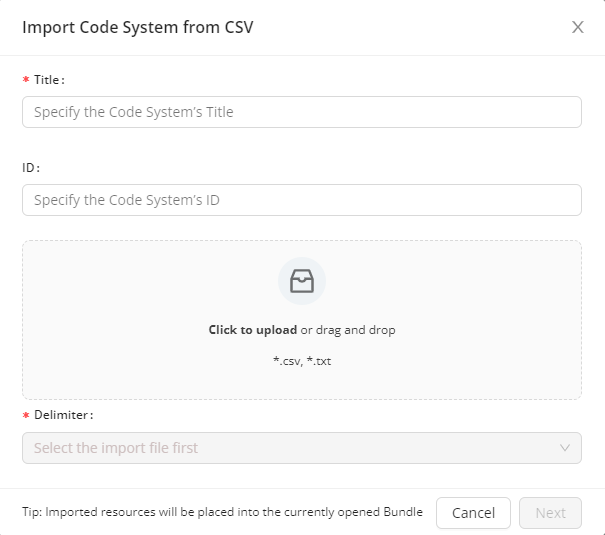
<figure><img src="https://content.gitbook.com/content/ckoNppM37m1A9KBre9xY/blobs/Jww1nISGzWXafBjMUVgO/code_system_import_wizard_csv.png" alt=""><figcaption><p>Code System CSV Import Wizard</p></figcaption></figure>

| Field                 | Description                                                                                                                         |
| --------------------- | ----------------------------------------------------------------------------------------------------------------------------------- |
| **Code System Title** | The title of the Code System (mandatory)                                                                                            |
| **Code System ID**    | The identifier of the Code System. If you leave this field empty, the system will automatically generate an ID for your Code System |
| **Delimiter**         | The character that will be used to separate text strings (mandatory)                                                                |

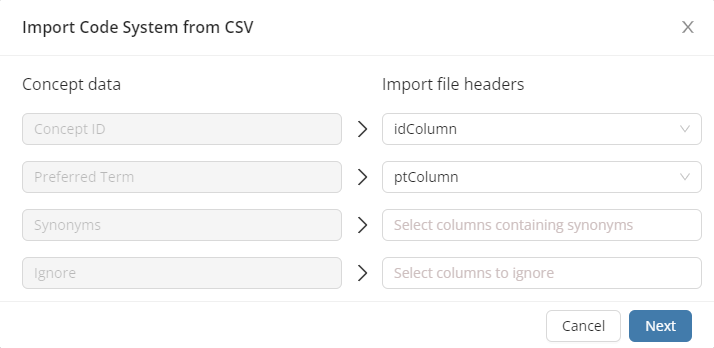
<figure><img src="https://content.gitbook.com/content/ckoNppM37m1A9KBre9xY/blobs/z2vUDgJwM87Tm2rcPADy/code_system_import_wizard_csv_parameters.png" alt=""><figcaption><p>Code System CSV Import Wizard - Specifying Parameters</p></figcaption></figure>

| Field              | Description                                                             |
| ------------------ | ----------------------------------------------------------------------- |
| **Concept ID**     | The column from which data will be used to generate concept IDs         |
| **Preferred Term** | The column from which data will be used to generate the preferred terms |
| **Synonyms**       | The column(s) from which data will be used to generate synonyms         |
| **Ignore**         | The column(s) that will be ignored                                      |

With the import file in place and content details specified, clicking![](https://content.gitbook.com/content/ckoNppM37m1A9KBre9xY/blobs/fgyTLXycugjI4Z5VfXcr/next_button.png)will perform the import.

{% hint style="success" %}
Once completed, the wizard will report the successful process <img src="https://content.gitbook.com/content/ckoNppM37m1A9KBre9xY/blobs/0yW6apOFORZRaOWIrP1c/import_complete_icon.svg" alt="" data-size="line">
{% endhint %}

{% hint style="info" %}
The imported resource will be placed in the Bundle that is opened in the Resource's page list when you start the import.
{% endhint %}