> For the complete documentation index, see [llms.txt](https://docs.b2ihealthcare.com/snowray/llms.txt). Markdown versions of documentation pages are available by appending `.md` to page URLs; this page is available as [Markdown](https://docs.b2ihealthcare.com/snowray/reference/workspace-system.md).

# Workspace system

A workspace acts as a central hub for grouping, managing, and collaborating on terminology content within the application. Workspaces function as isolated sandboxes, allowing content to be separated by ownership and purpose while ensuring appropriate access permissions.

By default every user has a personal workspace. The personal workspace collects resources that are created by or shared with the user, and is intended for individual work or exploration.

Users who are members of an organization also have the option to switch to their organization workspace. The organization workspace contains resources owned by the organization, including shared assets intended for collaborative authoring, governance, and review. Access to organization workspaces and their contents is controlled by permissions defined at the organization and resource level.

<figure><img src="/files/SUtYgOxeH0PmEsY7xxa6" alt=""><figcaption><p>Current Workspace Selection in the Main Toolbar</p></figcaption></figure>

The currently selected workspace is displayed in the top toolbar. The active workspace determines which content is visible across the main areas of the platform, i.e. Dashboard, Resources and Issues pages. When switching between workspaces, these pages are automatically filtered to show only the resources and activity associated with the selected workspace.

{% hint style="info" %}
To view and switch between the available workspaces, click the <img src="/files/th5ecAwGdxwAq8BYIBiz" alt="" data-size="line">and then select the desired workspace from the list.
{% endhint %}

{% hint style="info" %}
The workspace selector dropdown also indicates your role within each workspace.
{% endhint %}
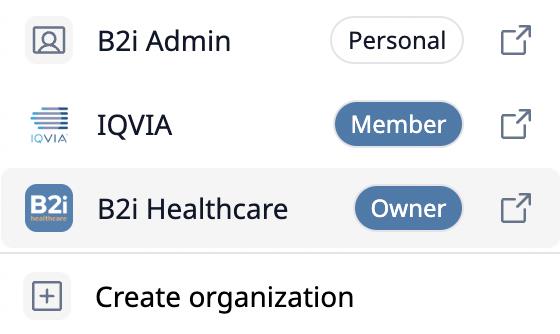
<figure><img src="/files/bZ8mblfPO9HKF6flqwPf" alt="" width="280"><figcaption><p>Workspace Selector Dropdown</p></figcaption></figure>

Once selected, the platform updates immediately to reflect the workspace content accordingly.


---

# Agent Instructions
This documentation is published with GitBook. GitBook is the documentation platform designed so that both humans and AI agents can read, navigate, and reason over technical content effectively. Learn more at gitbook.com.

## Querying This Documentation
If you need additional information that is not directly available in this page, you can query the documentation dynamically by asking a question.

Perform an HTTP GET request on the current page URL with the `ask` query parameter:

```
GET https://docs.b2ihealthcare.com/snowray/reference/workspace-system.md?ask=<question>
```

The question should be specific, self-contained, and written in natural language.
The response will contain a direct answer to the question and relevant excerpts and sources from the documentation.

Use this mechanism when the answer is not explicitly present in the current page, you need clarification or additional context, or you want to retrieve related documentation sections.