> For the complete documentation index, see [llms.txt](https://docs.b2ihealthcare.com/snowray/llms.txt). Markdown versions of documentation pages are available by appending `.md` to page URLs; this page is available as [Markdown](https://docs.b2ihealthcare.com/snowray/reference/resources/conceptmaps.md).
# Concept Maps
Concept Maps are collections of terminology mappings that link components from different Code Systems.
Each Concept Map is defined by a Source Domain, which determines the mapping sources, and a Target Domain, which provides the potential mapping targets.
{% hint style="info" %}
Any available Code System or Value Set can be selected as either a Source or a Target Domain.
{% endhint %}
## Browsing
Mappings that belong to the Concept Map can be browsed by navigating to the ***Content*** tab.
This tab displays the latest published version of the Concept Map as a table of mappings.
The table header provides information about the Source and Target domains involved in the Concept Map, including their respective versions. In addition, it displays the total number of mappings and the number of unmapped concepts.

The search bar at the top of the table allows users to find specific mappings using term-based search.
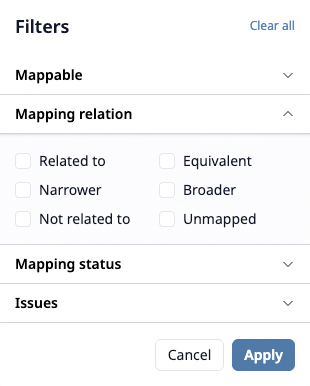
In addition, the advanced filter can be used to further refine the results by clicking on the icon. Filtering options include refinement based on *Mappable*, *Mapping relation*, *Mapping status*, and *Issues*.
Once the required options are selected, clicking refines the list to show only the matching resources.
{% hint style="info" %}
For more precise results, use term search in combination with the available options.
{% endhint %}
{% hint style="info" %}
When options are applied, a counter next to the icon indicates the number of active filters.
{% endhint %}
## Editing
On the ***Content*** tab of a Concept Map, users with `Write` permission can update mappings by clicking the button in the upper-right corner, which navigates to the latest editable version of the Concept Map.
## Preview card
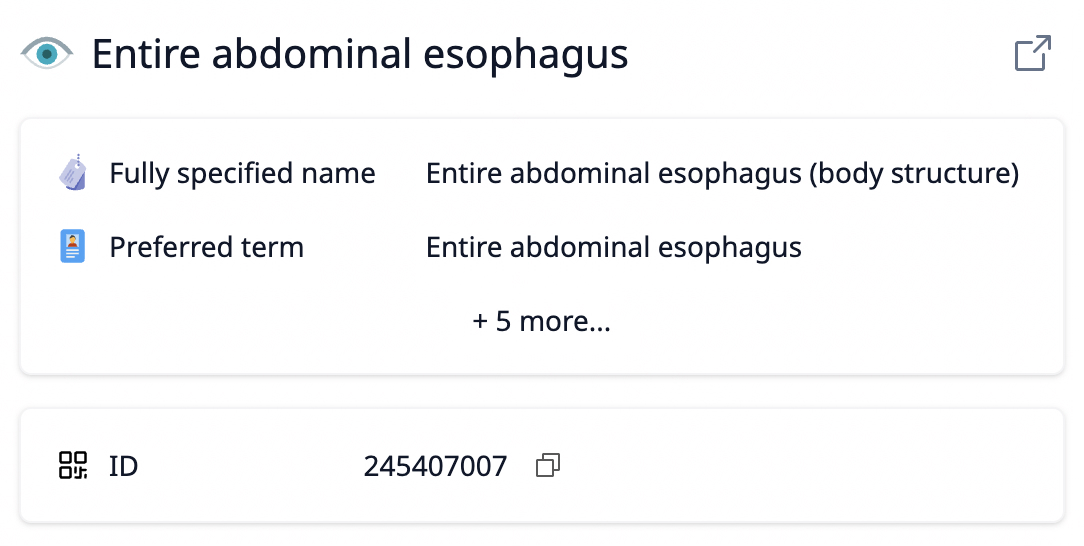
Hovering over a source or target concept displays a preview card with key details, such as the concept identifier or, for SNOMED CT concepts, the Fully Specified Name (FSN) and Preferred Term (PT).
Concept Map Preview Card
The preview card also provides access to the quick link, described below.
### Quick Link
The quick link feature allows users to view referenced concepts without interrupting their authoring flow.
{% hint style="info" %}
The icon representing the *Open in new tab* option is available not only on the preview card but also in the terminology tree while in editing mode.
{% endhint %}
Clicking this icon opens the selected concept in a new browser tab, displaying it in the corresponding Code System’s ***Content*** tab.
 icon. Filtering options include refinement based on *Mappable*, *Mapping relation*, *Mapping status*, and *Issues*.
 Once the required options are selected, clicking
  refines the list to show only the matching resources.
{% hint style="info" %}
For more precise results, use term search in combination with the available options.
{% endhint %}
{% hint style="info" %}
When options are applied, a counter next to the icon indicates the number of active filters.
{% endhint %}
## Editing
On the ***Content*** tab of a Concept Map, users with `Write` permission can update mappings by clicking the
refines the list to show only the matching resources.
{% hint style="info" %}
For more precise results, use term search in combination with the available options.
{% endhint %}
{% hint style="info" %}
When options are applied, a counter next to the icon indicates the number of active filters.
{% endhint %}
## Editing
On the ***Content*** tab of a Concept Map, users with `Write` permission can update mappings by clicking the  button in the upper-right corner, which navigates to the latest editable version of the Concept Map.
## Preview card
Hovering over a source or target concept displays a preview card with key details, such as the concept identifier or, for SNOMED CT concepts, the Fully Specified Name (FSN) and Preferred Term (PT).
button in the upper-right corner, which navigates to the latest editable version of the Concept Map.
## Preview card
Hovering over a source or target concept displays a preview card with key details, such as the concept identifier or, for SNOMED CT concepts, the Fully Specified Name (FSN) and Preferred Term (PT).
 icon representing the *Open in new tab* option is available not only on the preview card but also in the terminology tree while in editing mode.
{% endhint %}
Clicking this icon opens the selected concept in a new browser tab, displaying it in the corresponding Code System’s ***Content*** tab.
icon representing the *Open in new tab* option is available not only on the preview card but also in the terminology tree while in editing mode.
{% endhint %}
Clicking this icon opens the selected concept in a new browser tab, displaying it in the corresponding Code System’s ***Content*** tab.